Showing posts with label test. Show all posts

Saturday, November 28, 2020

All Your Tests Belong to You: Maintaining Mixed JUnit 4/JUnit 5 and Testng/JUnit 5 Test Suites

If you are seasoned Java developer who practices test-driven development (hopefully, everyone does it), it is very likely JUnit 4 has been your one-stop-shop testing toolbox. Personally, I truly loved it and still love: simple, minimal, non-intrusive and intuitive. Along with terrific libraries like Assertj and Hamcrest it makes writing test cases a pleasure.

But time passes by, Java has evolved a lot as a language, however JUnit 4 was not really up for a ride. Around 2015 the development of JUnit 5 has started with ambitious goal to become a next generation of the programmer-friendly testing framework for Java and the JVM. And, to be fair, I think this goal has been reached: many new projects adopt JUnit 5 from the get-go whereas the old ones are already in the process of migration (or at least are thinking about it).

For existing projects, the migration to JUnit 5 will not happen overnight and would probably take some time. In today's post we are going to talk about the ways to maintain mixed JUnit 4 / JUnit 5 and TestNG / JUnit 5 test suites with a help of Apache Maven and Apache Maven Surefire plugin.

To have an example a bit more realistic, we are going to test a UploadDestination class, which basically just provides a single method which says if a particular destination scheme is supported or not:

import java.net.URI;

public class UploadDestination {
    public boolean supports(String location) {
        final String scheme = URI.create(location).getScheme();
        return scheme.equals("http") || scheme.equals("s3") || scheme.equals("sftp");
    }
}

The implementer was kind enough to create a suite of JUnit 4 unit tests to verify that all expected destination schemes are indeed supported.

import static org.junit.Assert.assertTrue;

import org.junit.Before;
import org.junit.Test;
import org.junit.runner.RunWith;
import org.junit.runners.Parameterized;
import org.junit.runners.Parameterized.Parameters;

@RunWith(Parameterized.class)
public class JUnit4TestCase {
    private UploadDestination destination;
    private final String location;

    public JUnit4TestCase(String location) {
        this.location = location;
    }

    @Before
    public void setUp() {
        destination = new UploadDestination();
    }

    @Parameters(name= "{index}: location {0} is supported")
    public static Object[] locations() {
        return new Object[] { "s3://test", "http://host:9000", "sftp://host/tmp" };
    }

    @Test
    public void testLocationIsSupported() {
        assertTrue(destination.supports(location));
    }
}

In the project build, at very least, you need to add JUnit 4 dependency along with Apache Maven Surefire plugin and, optionally Apache Maven Surefire Reporter plugin, to your pom.xml, the snippet below illustrates that.

    <dependencies>
        <dependency>
            <groupId>junit</groupId>
            <artifactId>junit</artifactId>
            <version>4.13.1</version>
            <scope>test</scope>
        </dependency>
    </dependencies>

    <build>
        <plugins>
            <plugin>
                <groupId>org.apache.maven.plugins</groupId>
                <artifactId>maven-surefire-plugin</artifactId>
                <version>3.0.0-M5</version>
            </plugin>

            <plugin>
                <groupId>org.apache.maven.plugins</groupId>
                <artifactId>maven-surefire-report-plugin</artifactId>
                <version>3.0.0-M5</version>
            </plugin>
        </plugins>
    </build>

No magic here, triggering Apache Maven build would normally run all unit test suites every time.

...
[INFO] -------------------------------------------------------
[INFO]  T E S T S
[INFO] -------------------------------------------------------
[INFO] Running com.example.JUnit4TestCase
[INFO] Tests run: 3, Failures: 0, Errors: 0, Skipped: 0, Time elapsed: 0.011 s - in com.example.JUnit4TestCase
[INFO]
[INFO] Results:
[INFO]
[INFO] Tests run: 3, Failures: 0, Errors: 0, Skipped: 0
[INFO]
[INFO] ------------------------------------------------------------------------
...

Awesome, let us imagine at some point another teammate happens to work on the project and noticed there are no unit tests verifying the unsupported destination schemes so she adds some using JUnit 5.

package com.example;

import static org.junit.jupiter.api.Assertions.assertFalse;

import org.junit.jupiter.api.BeforeEach;
import org.junit.jupiter.params.ParameterizedTest;
import org.junit.jupiter.params.provider.ValueSource;

class JUnit5TestCase {
    private UploadDestination destination;

    @BeforeEach
    void setUp() {
        destination = new UploadDestination();
    }

    @ParameterizedTest(name = "{index}: location {0} is supported")
    @ValueSource(strings = { "s3a://test", "https://host:9000", "ftp://host/tmp" } )
    public void testLocationIsNotSupported(String location) {
        assertFalse(destination.supports(location));
    }
}

Consequently, another dependency appears in the project's pom.xml to bring JUnit 5 in (since its API is not compatible with JUnit 4).

    <dependencies>
        <dependency>
            <groupId>org.junit.jupiter</groupId>
            <artifactId>junit-jupiter</artifactId>
            <version>5.7.0</version>
            <scope>test</scope>
        </dependency>
    </dependencies>

Looks quite legitimate, isn't it? But there is a catch ... the test run results would surprise this time.

...
[INFO] -------------------------------------------------------
[INFO]  T E S T S
[INFO] -------------------------------------------------------
[INFO] Running com.example.JUnit5TestCase
[INFO] Tests run: 3, Failures: 0, Errors: 0, Skipped: 0, Time elapsed: 0.076 s - in com.example.JUnit5TestCase
[INFO]
[INFO] Results:
[INFO]
[INFO] Tests run: 3, Failures: 0, Errors: 0, Skipped: 0
[INFO]
[INFO] ------------------------------------------------------------------------
...

The JUnit 4 test suites are gone and such a behavior is actually well documentented by Apache Maven Surefire team in the Provider Selection section of the official documentation. So how we could get them back? There are a few possible options but the simplest one by far is to use JUnit Vintage engine in order to run JUnit 4 test suites using JUnit 5 platform.

            <plugin>
                <groupId>org.apache.maven.plugins</groupId>
                <artifactId>maven-surefire-plugin</artifactId>
                <version>3.0.0-M5</version>
                <dependencies>
                    <dependency>
                        <groupId>org.junit.vintage</groupId>
                        <artifactId>junit-vintage-engine</artifactId>
                        <version>5.7.0</version>
                    </dependency>
                </dependencies>
            </plugin>

With that, both JUnit 4 and JUnit 5 test suites are going to be executed side by side.

[INFO] -------------------------------------------------------
[INFO]  T E S T S
[INFO] -------------------------------------------------------
[INFO] Running com.example.JUnit5TestCase
[INFO] Tests run: 3, Failures: 0, Errors: 0, Skipped: 0, Time elapsed: 0.079 s - in com.example.JUnit5TestCase
[INFO] Running com.example.JUnit4TestCase
[INFO] Tests run: 3, Failures: 0, Errors: 0, Skipped: 0, Time elapsed: 0.009 s - in com.example.JUnit4TestCase
[INFO] 
[INFO] Results:
[INFO]
[INFO] Tests run: 6, Failures: 0, Errors: 0, Skipped: 0
[INFO]
[INFO] ------------------------------------------------------------------------

The lesson to learn here: please watch carefully that all your test suites are being executed (the CI/CD usually keeps track of such trends and warns you right away). Especially, be extra careful when migrating to latest Spring Boot or Apache Maven Surefire plugin versions.

Another quite common use case you may run into is mixing the TestNG and JUnit 5 test suites in the scope of one project. The symptoms are pretty much the same, you are going to wonder why only JUnit 5 test suites are being run. The treatment in this case is a bit different and one of the options which seems to work pretty well is to enumerate the test engine providers explicitly.

            <plugin>
                <groupId>org.apache.maven.plugins</groupId>
                <artifactId>maven-surefire-plugin</artifactId>
                <version>3.0.0-M5</version>
                <dependencies>
                    <dependency>                                      
                        <groupId>org.apache.maven.surefire</groupId>  
                        <artifactId>surefire-junit-platform</artifactId>      
                        <version>3.0.0-M5</version>                   
                    </dependency>
                    <dependency>                                      
                        <groupId>org.apache.maven.surefire</groupId>  
                        <artifactId>surefire-testng</artifactId>      
                        <version>3.0.0-M5</version>                   
                    </dependency>                          
                </dependencies>
            </plugin>

The somewhat undesired effect in this case is the fact that the test suites are run separately (there are other ways though to try out), for example:

[INFO] -------------------------------------------------------
[INFO]  T E S T S
[INFO] -------------------------------------------------------
[INFO] Running com.example.JUnit5TestCase
[INFO] Tests run: 3, Failures: 0, Errors: 0, Skipped: 0, Time elapsed: 0.074 s - in com.example.JUnit5TestCase
[INFO] 
[INFO] Results:
[INFO]
[INFO] Tests run: 3, Failures: 0, Errors: 0, Skipped: 0
[INFO]
[INFO] 
[INFO] -------------------------------------------------------
[INFO]  T E S T S
[INFO] -------------------------------------------------------
[INFO] Running TestSuite
[INFO] Tests run: 3, Failures: 0, Errors: 0, Skipped: 0, Time elapsed: 0.315 s - in TestSuite
[INFO] 
[INFO] Results:
[INFO]
INFO] Tests run: 3, Failures: 0, Errors: 0, Skipped: 0
[INFO]
[INFO] 
[INFO] ------------------------------------------------------------------------

To be fair, I think JUnit 5 is a huge step forward towards having modern and concise test suites for your Java (and in general, JVM) projects. These days there are seamless integrations available with mostly any other test framework or library (Mockito, TestContainers, ... ) and the migration path is not that difficult in most cases. Plus, as you have seen, co-existence of JUnit 5 with older test engines is totally feasible.

As always, the complete project samples are available on Github: JUnit 4/JUnit 5, TestNG / JUnit 5.

Thursday, July 18, 2019

Testing Spring Boot conditionals the sane way

If you are more or less experienced Spring Boot user, it is very luckily that at some point you may need to run into the situation when the particular beans or configurations have to be injected conditionally. The mechanics of it is well understood but sometimes the testing such conditions (and their combinations) could get messy. In this post we are going to talk about some possible (arguably, sane) ways to approach that.

Since Spring Boot 1.5.x is still widely used (nonetheless it is racing towards the EOL this August), we would include it along with Spring Boot 2.1.x, both with JUnit 4.x and JUnit 5.x. The techniques we are about to cover are equally applicable to the regular configuration classes as well as auto-configurations classes.

The example we will be playing with would be related to our home-made logging. Let us assume our Spring Boot application requires some bean for dedicated logger with name "sample". In certain circumstances however this logger has to be disabled (or become effectively a noop), so the property logging.enabled serves like a kill switch here. We use Slf4j and Logback in this example, but it is not really important. The LoggingConfiguration snippet below reflects this idea.

@Configuration
public class LoggingConfiguration {
    @Configuration
    @ConditionalOnProperty(name = "logging.enabled", matchIfMissing = true)
    public static class Slf4jConfiguration {
        @Bean
        Logger logger() {
            return LoggerFactory.getLogger("sample");
        }
    }
    
    @Bean
    @ConditionalOnMissingBean
    Logger logger() {
        return new NOPLoggerFactory().getLogger("sample"); 
    }
}

So how would we test that? Spring Boot (and Spring Framework in general) has always offered the outstanding test scaffolding support. The @SpringBootTest and @TestPropertySource annotations allow to quickly bootstrap the application context with the customized properties. There is one issue though: they are applied per test class level, not a per test method. It certainly makes sense but basically requires you to create a test class per combination of conditionals.

If you are still with JUnit 4.x, there is one trick you may found useful which exploits Enclosed runner, the hidden gem of the framework.

@RunWith(Enclosed.class)
public class LoggingConfigurationTest {
    @RunWith(SpringRunner.class)
    @SpringBootTest
    public static class LoggerEnabledTest {
        @Autowired private Logger logger;
        
        @Test
        public void loggerShouldBeSlf4j() {
            assertThat(logger).isInstanceOf(ch.qos.logback.classic.Logger.class);
        }
    }
    
    @RunWith(SpringRunner.class)
    @SpringBootTest
    @TestPropertySource(properties = "logging.enabled=false")
    public static class LoggerDisabledTest {
        @Autowired private Logger logger;
        
        @Test
        public void loggerShouldBeNoop() {
            assertThat(logger).isSameAs(NOPLogger.NOP_LOGGER);
        }
    }
}

You still have the class per condition but at least they are all in the same nest. With JUnit 5.x, some things got easier but not to the level as one might expect. Unfortunately, Spring Boot 1.5.x does not support JUnit 5.x natively, so we have to rely on extension provided by spring-test-junit5 community module. Here are the relevant changes in pom.xml, please notice that junit is explicitly excluded from the spring-boot-starter-test dependencies graph.

<dependency>
    <groupId>org.springframework.boot</groupId>
    <artifactId>spring-boot-starter-test</artifactId>
    <scope>test</scope>
    <exclusions>
        <exclusion>
            <groupId>junit</groupId>
            <artifactId>junit</artifactId>
        </exclusion>
    </exclusions>
</dependency>

<dependency>
    <groupId>com.github.sbrannen</groupId>
    <artifactId>spring-test-junit5</artifactId>
    <version>1.5.0</version>
    <scope>test</scope>
</dependency>

<dependency>
    <groupId>org.junit.jupiter</groupId>
    <artifactId>junit-jupiter-api</artifactId>
    <version>5.5.0</version>
    <scope>test</scope>
</dependency>

<dependency>
    <groupId>org.junit.jupiter</groupId>
    <artifactId>junit-jupiter-engine</artifactId>
    <version>5.5.0</version>
    <scope>test</scope>
</dependency>

The test case itself is not very different besides usage of the @Nested annotation, which comes from JUnit 5.x to support tests as inner classes.

public class LoggingConfigurationTest {
    @Nested
    @ExtendWith(SpringExtension.class)
    @SpringBootTest
    @DisplayName("Logging is enabled, expecting Slf4j logger")
    public static class LoggerEnabledTest {
        @Autowired private Logger logger;
        
        @Test
        public void loggerShouldBeSlf4j() {
            assertThat(logger).isInstanceOf(ch.qos.logback.classic.Logger.class);
        }
    }
    
    @Nested
    @ExtendWith(SpringExtension.class)
    @SpringBootTest
    @TestPropertySource(properties = "logging.enabled=false")
    @DisplayName("Logging is disabled, expecting NOOP logger")
    public static class LoggerDisabledTest {
        @Autowired private Logger logger;
        
        @Test
        public void loggerShouldBeNoop() {
            assertThat(logger).isSameAs(NOPLogger.NOP_LOGGER);
        }
    }
}

If you try to run the tests from the command line using Apache Maven and Maven Surefire plugin, you might be surprised to see that none of them were executed during the build. The issue is that ... all nested classes are excluded ... so we need to put in place another workaround.

<plugin>
    <groupId>org.apache.maven.plugins</groupId>
    <artifactId>maven-surefire-plugin</artifactId>
    <version>2.22.2</version>
    <configuration>
        <excludes>
            <exclude />
        </excludes>
    </configuration>
</plugin>

With that, things should be rolling smoothly. But enough about legacy, the Spring Boot 2.1.x comes as the complete game changer. The family of the context runners, ApplicationContextRunner, ReactiveWebApplicationContextRunner and WebApplicationContextRunner, provide an easy and straightforward way to tailor the context on per test method level, keeping the test executions incredibly fast.

public class LoggingConfigurationTest {
    private final ApplicationContextRunner runner = new ApplicationContextRunner()
        .withConfiguration(UserConfigurations.of(LoggingConfiguration.class));
    
    @Test
    public void loggerShouldBeSlf4j() {
        runner
            .run(ctx -> 
                assertThat(ctx.getBean(Logger.class)).isInstanceOf(Logger.class)
            );
    }
    
    @Test
    public void loggerShouldBeNoop() {
        runner
            .withPropertyValues("logging.enabled=false")
            .run(ctx -> 
                assertThat(ctx.getBean(Logger.class)).isSameAs(NOPLogger.NOP_LOGGER)
            );
    }
}

It looks really great. The JUnit 5.x support in Spring Boot 2.1.x is much better and with the the upcoming 2.2 release, JUnit 5.x will be the default engine (not to worry, the old JUnit 4.x will still be supported). As of now, the switch to JUnit 5.x needs a bit of work on dependencies side.

<dependency>
    <groupId>org.springframework.boot</groupId>
    <artifactId>spring-boot-starter-test</artifactId>
    <scope>test</scope>
    <exclusions>
        <exclusion>
            <groupId>junit</groupId>
            <artifactId>junit</artifactId>
        </exclusion>
    </exclusions>
</dependency>

<dependency>
    <groupId>org.junit.jupiter</groupId>
    <artifactId>junit-jupiter-api</artifactId>
    <scope>test</scope>
</dependency>

<dependency>
    <groupId>org.junit.jupiter</groupId>
    <artifactId>junit-jupiter-engine</artifactId>
    <scope>test</scope>
</dependency>

As an additional step, you may need to use recent Maven Surefire plugin, 2.22.0 or above, with out-of-the box JUnit 5.x support. The the snippet below illustrates that.

<plugin>
    <groupId>org.apache.maven.plugins</groupId>
    <artifactId>maven-surefire-plugin</artifactId>
    <version>2.22.2</version>
</plugin>

The sample configuration we have worked with is pretty naive, many of the real-world applications would end up with quite complex contexts built out of many conditionals. The flexibility and enormous opportunities that come out of the context runners, the invaluable addition to the Spring Boot 2.x test scaffolding, are just the live savers, please keep them in mind.

The complete project sources are available on Github.

Sunday, November 27, 2016

Keep your promises: contract-based testing for JAX-RS APIs

It's been a while since we talked about testing and applying effective TDD practices, particularly related to REST(ful) web services and APIs. But this topic should have never been forgotten, especially in the world where everyone is doing microservices, whatever it means, implies or takes.

To be fair, there are quite a lot of areas where microservice-based architecture shines and allows organizations to move and innovate much faster. But without a proper discipline, it also makes our systems fragile, as they become very loosely coupled. In today's post we are going to talk about contract-based testing and consumer-driven contracts as a practical and reliable techniques to ensure that our microservices fulfill their promises.

So, how does contract-based testing work? In nutshell, it is surprisingly simple technique and is guided by following steps:

  • provider (let say Service A) publishes its contact (or specification), the implementation may not even be available at this stage
  • consumer (let say Service B) follows this contract (or specification) to implement conversations with Service A
  • additionally, consumer introduces a test suite to verify its expectations regarding Service A contract fulfillment
In case of SOAP web services and APIs, things are obvious as there is an explicit contract in a form of WSDL file. But in case of REST(ful) APIs, there are a lot of different options around the corner (WADL, RAML, Swagger, ...) and still no agreement on the one. It may sound complicated but please don't get upset, because Pact is coming on the rescue!

Pact is family of frameworks for supporting consumer-driven contracts testing. There are many language bindings and implementations available, including JVM ones, JVM Pact and Scala-Pact. To evolve such a polyglot ecosystem, Pact also includes a dedicated specification so to provide interoperability between different implementations.

Great, Pact is there, the stage is set and we are ready to take off with some real code snippets. Let us assume we are developing a REST(ful) web API for managing people, using terrific Apache CXF and JAX-RS 2.0 specification. To keep things simple, we are going to introduce only two endpoints:

  • POST /people/v1 to create new person
  • GET /people/v1?email=<email> to find person by email address
Essentially, we may not bother and just communicate these minimal pieces of our service contract to everyone so let the consumers deal with that themselves (and indeed, Pact supports such a scenario). But surely, we are not like that, we do care and would like to document our APIs comprehensively, likely we are already familiar with Swagger. With that, here is our PeopleRestService.
@Api(value = "Manage people")
@Path("/people/v1")
@Consumes(MediaType.APPLICATION_JSON)
@Produces(MediaType.APPLICATION_JSON)
public class PeopleRestService {
    @GET
    @ApiOperation(value = "Find person by e-mail", 
        notes = "Find person by e-mail", response = Person.class)
    @ApiResponses({
        @ApiResponse(code = 404, 
            message = "Person with such e-mail doesn't exists", 
            response = GenericError.class)
    })
    public Response findPerson(
        @ApiParam(value = "E-Mail address to lookup for", required = true) 
        @QueryParam("email") final String email) {
        // implementation here
    }

    @POST
    @ApiOperation(value = "Create new person", 
        notes = "Create new person", response = Person.class)
    @ApiResponses({
        @ApiResponse(code = 201, 
            message = "Person created successfully", 
            response = Person.class),
        @ApiResponse(code = 409, 
            message = "Person with such e-mail already exists", 
            response = GenericError.class)
    })
    public Response addPerson(@Context UriInfo uriInfo, 
        @ApiParam(required = true) PersonUpdate person) {
        // implementation here
    }
}

The implementation details are not important at the moment, however let us take a look at the GenericError, PersonUpdate and Person classes as they are an integral part of our service contract.

@ApiModel(description = "Generic error representation")
public class GenericError {
    @ApiModelProperty(value = "Error message", required = true)
    private String message;
}

@ApiModel(description = "Person resource representation")
public class PersonUpdate {
    @ApiModelProperty(value = "Person's first name", required = true) 
    private String email;
    @ApiModelProperty(value = "Person's e-mail address", required = true) 
    private String firstName;
    @ApiModelProperty(value = "Person's last name", required = true) 
    private String lastName;
    @ApiModelProperty(value = "Person's age", required = true) 
    private int age;
}

@ApiModel(description = "Person resource representation")
public class Person extends PersonUpdate {
    @ApiModelProperty(value = "Person's identifier", required = true) 
    private String id;
}

Excellent! Once we have Swagger annotations in place and Apache CXF Swagger integration turned on, we could generate swagger.json specification file, bring it to live in Swagger UI and distribute to every partner or interested consumer.

Would be great if we could use this Swagger specification along with Pact framework implementation to serve as a service contract. Thanks to Atlassian, we are certainly able to do that using swagger-request-validator, a library for validating HTTP request/respons against a Swagger/OpenAPI specification which nicely integrates with Pact JVM as well.

Cool, now let us switch sides from provider to consumer and try to figure out what we can do having such Swagger specification in our hands. It turns out, we can do a lot of things. For example, let us take a look at the POST action, which creates new person. As a client (or consumer), we could express our expectations in such a form that having a valid payload submitted along with the request, we expect HTTP status code 201 to be returned by the provider and the response payload should contain a new person with identifier assigned. In fact, translating this statement into Pact JVM assertions is pretty straightforward.

@Pact(provider = PROVIDER_ID, consumer = CONSUMER_ID)
public PactFragment addPerson(PactDslWithProvider builder) {
    return builder
        .uponReceiving("POST new person")
        .method("POST")
        .path("/services/people/v1")
        .body(
            new PactDslJsonBody()
                .stringType("email")
                .stringType("firstName")
                .stringType("lastName")
                .numberType("age")
        )
        .willRespondWith()
        .status(201)
        .matchHeader(HttpHeaders.CONTENT_TYPE, MediaType.APPLICATION_JSON)
        .body(
            new PactDslJsonBody()
                .uuid("id")
                .stringType("email")
                .stringType("firstName")
                .stringType("lastName")
                .numberType("age")
        )
       .toFragment();
}

To trigger the contract verification process, we are going to use awesome JUnit and very popular REST Assured framework. But before that, let us clarify on what is PROVIDER_ID and CONSUMER_ID from the code snippet above. As you may expect, PROVIDER_ID is the reference to the contract specification. For simplicity, we would fetch Swagger specification from running PeopleRestService endpoint, luckily Spring Boot testing improvements make this task a no-brainer.

@RunWith(SpringJUnit4ClassRunner.class)
@SpringBootTest(webEnvironment = WebEnvironment.RANDOM_PORT, 
    classes = PeopleRestConfiguration.class)
public class PeopleRestContractTest {
    private static final String PROVIDER_ID = "People Rest Service";
    private static final String CONSUMER_ID = "People Rest Service Consumer";

    private ValidatedPactProviderRule provider;
    @Value("${local.server.port}")
    private int port;

    @Rule
    public ValidatedPactProviderRule getValidatedPactProviderRule() {
        if (provider == null) {
            provider = new ValidatedPactProviderRule("http://localhost:" + port + 
                "/services/swagger.json", null, PROVIDER_ID, this);
        }

        return provider;
    }
}

The CONSUMER_ID is just a way to identify the consumer, not much to say about it. With that, we are ready to finish up with our first test case:

@Test
@PactVerification(value = PROVIDER_ID, fragment = "addPerson")
public void testAddPerson() {
    given()
        .contentType(ContentType.JSON)
        .body(new PersonUpdate("tom@smith.com", "Tom", "Smith", 60))
        .post(provider.getConfig().url() + "/services/people/v1");
}

Awesome! As simple as that, just please notice the presence of @PactVerification annotation where we are referencing the appropriate verification fragment by name, in this case it points out to addPerson method we have introduced before.

Great, but ... what the point? Glad you are asking, because from now on any change in the contract which may not be backward compatible will break our test case. For example, if provider decides to remove the id property from the response payload, the test case will fail. Renaming the request payload properties, big no-no, again, test case will fail. Adding new path parameters? No luck, test case won't let it pass. You may go even further than that and fail on every contract change, even if it backward-compatible (using swagger-validator.properties for fine-tuning).

validation.response=ERROR
validation.response.body.missing=ERROR

No a very good idea but still, if you need it, it is there. Similarly, let us add a couple of more test cases for GET endpoint, starting from successful scenario, where person we are looking for exists, for example:

@Pact(provider = PROVIDER_ID, consumer = CONSUMER_ID)
public PactFragment findPerson(PactDslWithProvider builder) {
    return builder
        .uponReceiving("GET find person")
        .method("GET")
        .path("/services/people/v1")
        .query("email=tom@smith.com")
        .willRespondWith()
        .status(200)
        .matchHeader(HttpHeaders.CONTENT_TYPE, MediaType.APPLICATION_JSON)
        .body(
            new PactDslJsonBody()
                .uuid("id")
                .stringType("email")
                .stringType("firstName")
                .stringType("lastName")
                .numberType("age")
        )
        .toFragment();
}

@Test
@PactVerification(value = PROVIDER_ID, fragment = "findPerson")
public void testFindPerson() {
    given()
        .contentType(ContentType.JSON)
        .queryParam("email", "tom@smith.com")
        .get(provider.getConfig().url() + "/services/people/v1");
}

Please take a note that here we introduced query string verification using query("email=tom@smith.com") assertion. Following the possible outcomes, let us also cover the unsuccessful scenario, where person does not exist and we expect some error to be returned, along with 404 status code, for example:

@Pact(provider = PROVIDER_ID, consumer = CONSUMER_ID)
public PactFragment findNonExistingPerson(PactDslWithProvider builder) {
    return builder
        .uponReceiving("GET find non-existing person")
        .method("GET")
        .path("/services/people/v1")
        .query("email=tom@smith.com")
        .willRespondWith()
        .status(404)
        .matchHeader(HttpHeaders.CONTENT_TYPE, MediaType.APPLICATION_JSON)
        .body(new PactDslJsonBody().stringType("message"))
        .toFragment();
}

@Test
@PactVerification(value = PROVIDER_ID, fragment = "findNonExistingPerson")
public void testFindPersonWhichDoesNotExist() {
    given()
        .contentType(ContentType.JSON)
        .queryParam("email", "tom@smith.com")
        .get(provider.getConfig().url() + "/services/people/v1");
}

Really brilliant, maintainable, understandable and non-intrusive approach to address such a complex and important problems as contract-based testing and consumer-driven contracts. Hopefully, this somewhat new testing technique would help you to catch more issues during the development phase, way before they would have a chance to leak into production.

Thanks to Swagger we were able to take a few shortcuts, but in case you don't have such a luxury, Pact has quite rich specification which you are very welcome to learn and use. In any case, Pact JVM does a really great job in helping you out writing small and concise test cases.

The complete project sources are available on Github.

Thursday, April 28, 2016

Laziness at extreme: developing JAX-RS services with Spring Boot

I think it would be fair to state that we, as software developers, are always looking for the ways to write less code which does more stuff, automagically or not. With this regards, Spring Boot project, proud member of the Spring portfolio, disrupted the traditional approaches, dramatically speeding up and simplifying Spring-based applications development.

There is a lot to be said about Spring Boot, intrinsic details of how it works and its seamless integration with most if not all Spring projects. But its capabilities go far beyond that, supporting first-class integration with popular Java frameworks.

In this post we are going to take a look at how we can use Spring Boot in conjunction with Apache CXF project for a rapid REST(ful) web services development. As we are going to see very soon, Spring Boot takes care of quite a lot of boilerplate, letting us to concentrate on the parts of the application which do have real value. Hopefully, at the end of this post the benefits of adopting Spring Boot for your projects become apparent.

With that, let us get started by developing a simple people management REST(ful) web service, wrapped up into familiar PeopleRestService JAX-RS resource:

@Path("/people")
@Component
public class PeopleRestService {
    @GET
    @Produces({MediaType.APPLICATION_JSON})
    public Collection<Person> getPeople() {
        return Collections.singletonList(new Person("a@b.com", "John", "Smith"));
    }
}

Not much to add here, pretty simple implementation which returns the hard-coded collection of people. There are a couple of ways we can package and deploy this JAX-RS service, but arguably the simplest one is by hosting it inside embedded servlet container like Tomcat, Jetty or Undertow. With that comes the routine: container initialization, configuring Spring context locations, registering listeners, ... Let us see how Spring Boot can help here by dissecting the Spring context configuration below.

@Configuration
@EnableAutoConfiguration
@ComponentScan(basePackageClasses = PeopleRestService.class)
public class AppConfig {
    @Autowired private PeopleRestService peopleRestService;
 
    @Bean(destroyMethod = "shutdown")
    public SpringBus cxf() {
        return new SpringBus();
    }

    @Bean(destroyMethod = "destroy") @DependsOn("cxf")
    public Server jaxRsServer() {
        final JAXRSServerFactoryBean factory = new JAXRSServerFactoryBean();

        factory.setServiceBean(peopleRestService);
        factory.setProvider(new JacksonJsonProvider());
        factory.setBus(cxf());
        factory.setAddress("/");

        return factory.create();
    }

    @Bean
    public ServletRegistrationBean cxfServlet() {
        final ServletRegistrationBean servletRegistrationBean = 
            new ServletRegistrationBean(new CXFServlet(), "/api/*");
        servletRegistrationBean.setLoadOnStartup(1);
        return servletRegistrationBean;
    }
}

The AppConfig class looks like a typical Spring Java-based configuration except this unusual @EnableAutoConfiguration annotation, which with no surprise comes from Spring Boot module. Under the hood, this annotation enables a complex and intelligent process of guessing, among many other things, what kind of the application we are going to run and what kind of Spring beans we may need for our application. With this configuration in place, we just need to have a runner for our application, also with a bit of Spring Boot flavor:

@SpringBootApplication
public class Application {
    public static void main(String[] args) {
        SpringApplication.run(AppConfig.class, args);
    }
}

Having @SpringBootApplication meta-annotation and using SpringApplication to initialize our Spring context, we have a full-fledged runnable Java application, which could be run from Apache Maven using Spring Boot plugin:

mvn spring-boot:run
Or packaged as a single runnable uber-JAR and invoked from command line:
mvn package
java -jar target/jax-rs-2.0-cxf-spring-boot-0.0.1-SNAPSHOT.jar

And that's it, just a couple of annotations along with a single line of code (main method). Once we run the application, we could make sure that our people management REST(ful) web service is deployed properly and is fully operational:

$ curl -i http://localhost:8080/api/people

HTTP/1.1 200 OK
Content-Type: application/json;charset=utf-8
Transfer-Encoding: chunked
Server: Jetty(9.3.8.v20160314)

[{"email":"a@b.com","firstName":"John","lastName":"Smith"}]

At this point you may wonder how does it work? We have not dealt with servlet container anywhere so how come Jetty is serving our requests? The truth is, we only need to include our container of choice as a dependency, for example using Apache Maven's pom.xml file:

<dependency>
    <groupId>org.eclipse.jetty</groupId>
    <artifactId>jetty-server</artifactId>
    <version>9.3.8.v20160314</version>
</dependency>
Spring Boot along with @EnableAutoConfiguration/@SpringBootApplication does the rest: it detects the presence of Jetty in the classpath, comes to a valid conclusion that our intention is to run web application and complement the Spring context with the necessary pieces. Isn't it just brilliant?

It would be unfair to finish up without covering yet another important feature of the Spring Boot project: integration testing support. In this regards Spring Boot takes the same approach and provides a couple of annotations to take off all the scaffolding we would have to write ourselves otherwise. For example:

@RunWith(SpringJUnit4ClassRunner.class)
@SpringApplicationConfiguration(classes = AppConfig.class)
@WebIntegrationTest(randomPort = true)
public class PeopleRestServiceIntegrationTest {
    @Value("${local.server.port}") private int port;
 
    @Before
    public void setUp() {
        RestAssured.port = port;
    }
 
    @Test
    public void testListOfPersonsIsBeingReturnedSuccessfuly() {
        given()
            .when() 
            .contentType(ContentType.JSON)
            .get("/api/people")
            .then()
            .statusCode(200)
            .log()
            .ifValidationFails();
    }
}

Just two annotations, @SpringApplicationConfiguration (please notice that we are using the same configuration in test as for the main application) and @WebIntegrationTest (which takes the specifics of the web application testing into account and runs the embedded servlet container on random port), and we have full-fledged integration test against our people management JAX-RS service. The port which servlet container is running on is available through local.server.port environment property so we can configure REST-assured in the test background. Easy and simple.

In this post we have just looked at the one specific use case of using Spring Boot to increase the development velocity of your JAX-RS projects. Many, many things become very trivial with Spring Boot, with more and more intelligence being added with every single release, not to mention excellent integration with your IDE of choice. I hope you really got excited about Spring Boot and eager to learn more about it. It is worth the time and effort.

The complete project is available on Github.

Saturday, April 20, 2013

Fault Injection with Byteman and JUnit: do even more to ensure robustness of your applications

The time when our applications lived in isolation have passed long-long ago. Nowadays applications are a very complicated beasts talking to each other using myriads of APIs and protocols, storing data in traditional or NoSQL databases, sending messages and events over the wire ...

How often did you think about what will happen if, for example, a database goes down when your application is actively querying it? Or some API endpoint suddenly starts to refuse connection? Wouldn't it be nice to have such accidents covered as part of your test suite? That's what fault injection and Byteman framework are about.

As an example, we will build a realistic, full-blown Spring application which uses Hibernate/JPA to access MySQL database and manages customers. As part of application's JUnit integration test suite, we will include three kind of test cases:

  • store / find a customer
  • store customer and try to query database when it's down (fault simulation)
  • store customer and a database query times out (fault simulation)

There are only two preconditions for application to run on your local development box:

  • MySQL server is installed and has customers database
  • Oracle JDK is installed and JAVA_HOME environment variable points to it
That's being said, we are ready to go.

First, let's describe our domain model which consists from single class Customer with id and single property name. It looks as simple as that:

package com.example.spring.domain;

import java.io.Serializable;

import javax.persistence.Column;
import javax.persistence.Entity;
import javax.persistence.GeneratedValue;
import javax.persistence.Id;
import javax.persistence.Table;

@Entity
@Table( name = "customers" )
public class Customer implements Serializable{
    private static final long serialVersionUID = 1L;

    @Id
    @GeneratedValue
    @Column(name = "id", unique = true, nullable = false)
    private long id;
 
    @Column(name = "name", nullable = false)
    private String name;
  
    public Customer() {
    }
 
    public Customer( final String name ) {
        this.name = name;
    }

    public long getId() {
        return this.id;
    }

    protected void setId( final long id ) {
        this.id = id;
    }
 
    public String getName() {
        return this.name;
    }

    public void setName( final String name ) {
        this.name = name;
    }
}

For simplicity, the servicing layer is mixed with data access layer and calls database directly. Here is our CustomerService implementation:

package com.example.spring.services;

import javax.persistence.EntityManager;
import javax.persistence.PersistenceContext;

import org.springframework.stereotype.Service;
import org.springframework.transaction.annotation.Transactional;

import com.example.spring.domain.Customer;

@Service
public class CustomerService {
    @PersistenceContext private EntityManager entityManager;
 
    @Transactional( readOnly = true )
    public Customer find( long id ) {
        return this.entityManager.find( Customer.class, id );
    }

    @Transactional( readOnly = false )
    public Customer create( final String name ) {
        final Customer customer = new Customer( name );
        this.entityManager.persist(customer);
        return customer;
    }
 
    @Transactional( readOnly = false )
    public void deleteAll() {
        this.entityManager.createQuery( "delete from Customer" ).executeUpdate();
    }
}

And lastly, the Spring application context which defines data source and transaction manager. A small note here: as we won't introduce data access layer (@Repository) classes, in order for Spring to perform exception translation properly we define PersistenceExceptionTranslationPostProcessor instance to post-process service classes (@Service). Everything else should be very familiar.

package com.example.spring.config;

import java.util.Properties;

import javax.sql.DataSource;

import org.hibernate.dialect.MySQL5InnoDBDialect;
import org.springframework.context.annotation.Bean;
import org.springframework.context.annotation.ComponentScan;
import org.springframework.context.annotation.Configuration;
import org.springframework.dao.annotation.PersistenceExceptionTranslationPostProcessor;
import org.springframework.jdbc.datasource.DriverManagerDataSource;
import org.springframework.orm.jpa.JpaTransactionManager;
import org.springframework.orm.jpa.LocalContainerEntityManagerFactoryBean;
import org.springframework.orm.jpa.vendor.Database;
import org.springframework.orm.jpa.vendor.HibernateJpaVendorAdapter;
import org.springframework.stereotype.Service;
import org.springframework.transaction.PlatformTransactionManager;
import org.springframework.transaction.annotation.EnableTransactionManagement;

import com.example.spring.services.CustomerService;

@EnableTransactionManagement
@Configuration
@ComponentScan( basePackageClasses = CustomerService.class )
public class AppConfig {
    @Bean
    public PersistenceExceptionTranslationPostProcessor exceptionTranslationPostProcessor() {
        final PersistenceExceptionTranslationPostProcessor processor = new PersistenceExceptionTranslationPostProcessor();
        processor.setRepositoryAnnotationType( Service.class );
        return processor;
    }

    @Bean
    public HibernateJpaVendorAdapter hibernateJpaVendorAdapter() {
        final HibernateJpaVendorAdapter adapter = new HibernateJpaVendorAdapter();

        adapter.setDatabase( Database.MYSQL );
        adapter.setShowSql( false );

        return adapter;
    }

    @Bean
    public LocalContainerEntityManagerFactoryBean entityManager() throws Throwable {
        final LocalContainerEntityManagerFactoryBean entityManager = new LocalContainerEntityManagerFactoryBean();
     
        entityManager.setPersistenceUnitName( "customers" );
        entityManager.setDataSource( dataSource() );
        entityManager.setJpaVendorAdapter( hibernateJpaVendorAdapter() );

        final Properties properties = new Properties();
        properties.setProperty("hibernate.dialect", MySQL5InnoDBDialect.class.getName());
        properties.setProperty("hibernate.hbm2ddl.auto", "create-drop" );
        entityManager.setJpaProperties( properties );

        return entityManager;
    }

    @Bean
    public DataSource dataSource() {
        final DriverManagerDataSource dataSource = new DriverManagerDataSource();

        dataSource.setDriverClassName( com.mysql.jdbc.Driver.class.getName() );
        dataSource.setUrl( "jdbc:mysql://localhost/customers?enableQueryTimeouts=true" );
        dataSource.setUsername( "root" );
        dataSource.setPassword( "" );

        return dataSource;
    }

    @Bean
    public PlatformTransactionManager transactionManager() throws Throwable {
        return new JpaTransactionManager( this.entityManager().getObject() );
    }
}

Now let's add a simple JUnit test case to verify our Spring application actually works as expected. Before doing that, the database customers should be created:

> mysql -u root
mysql> create database customers;
Query OK, 1 row affected (0.00 sec)

And here is a CustomerServiceTestCase which for now has single test to create the customer and verify it's actually has been created.

package com.example.spring;

import static org.hamcrest.CoreMatchers.notNullValue;
import static org.junit.Assert.assertThat;

import javax.inject.Inject;

import org.junit.After;
import org.junit.Test;
import org.junit.runner.RunWith;
import org.springframework.test.context.ContextConfiguration;
import org.springframework.test.context.junit4.SpringJUnit4ClassRunner;
import org.springframework.test.context.support.AnnotationConfigContextLoader;

import com.example.spring.config.AppConfig;
import com.example.spring.domain.Customer;
import com.example.spring.services.CustomerService;

@RunWith( SpringJUnit4ClassRunner.class )
@ContextConfiguration(loader = AnnotationConfigContextLoader.class, classes = { AppConfig.class } )
public class CustomerServiceTestCase {
    @Inject private CustomerService customerService; 
 
    @After
    public void tearDown() {
        customerService.deleteAll();
    }

    @Test
    public void testCreateCustomerAndVerifyItHasBeenCreated() throws Exception {
        Customer customer = customerService.create( "Customer A" );
        assertThat( customerService.find( customer.getId() ), notNullValue() );
    }
}

That looks simple and straightforward. Now, let's think about scenario when customer creation succeeded but find fails because of query timeout. To do that, we need a help from Byteman.

In short, Byteman is bytecode manipulation framework. It's a Java agent implementation which runs with JVM (or attaches to it) and modifies running application bytecode as such changing its behavior. Byteman has a very good documentation and own rich set of rule definitions to perform mostly everything developer can come up with. Also, it has pretty good integration with JUnit framework. On that subject, Byteman tests are supposed to be run with @RunWith( BMUnitRunner.class ), but we already using @RunWith( SpringJUnit4ClassRunner.class ) and JUnit doesn't allow multiple test runners to be specified. Looks like a problem unless you are familiar with JUnit @Rule mechanics. It turns out that converting BMUnitRunner to JUnit rule is quite easy task:

package com.example.spring;

import org.jboss.byteman.contrib.bmunit.BMUnitRunner;
import org.junit.rules.MethodRule;
import org.junit.runners.model.FrameworkMethod;
import org.junit.runners.model.InitializationError;
import org.junit.runners.model.Statement;

public class BytemanRule extends BMUnitRunner implements MethodRule {
    public static BytemanRule create( Class< ? > klass ) {
        try {
            return new BytemanRule( klass ); 
        } catch( InitializationError ex ) { 
            throw new RuntimeException( ex ); 
        }
    }
 
    private BytemanRule( Class klass ) throws InitializationError {
        super( klass );
    }
 
    @Override
    public Statement apply( final Statement statement, final FrameworkMethod method, final Object target ) {
        Statement result = addMethodMultiRuleLoader( statement, method ); 
  
        if( result == statement ) {
            result = addMethodSingleRuleLoader( statement, method );
        }

        return result;
    }
}

And JUnit @Rule injection is as simple as that:

@Rule public BytemanRule byteman = BytemanRule.create( CustomerServiceTestCase.class );

Easy, right? The scenario we mentioned before could be rephrased a bit: when JDBC statement to select from 'customers' table is executed, we should fail with timeout exception. Here is how it looks like as JUnit test case with additional Byteman annotations:

    @Test( expected = DataAccessException.class )
    @BMRule(
        name = "introduce timeout while accessing MySQL database",
        targetClass = "com.mysql.jdbc.PreparedStatement",
        targetMethod = "executeQuery",
        targetLocation = "AT ENTRY",
        condition = "$0.originalSql.startsWith( \"select\" ) && !flagged( \"timeout\" )",
        action = "flag( \"timeout\" ); throw new com.mysql.jdbc.exceptions.MySQLTimeoutException( \"Statement timed out (simulated)\" )"
    )
    public void testCreateCustomerWhileDatabaseIsTimingOut()  {
        Customer customer = customerService.create( "Customer A" );
        customerService.find( customer.getId() );
    }

We could read it like this: "When someone calls executeQuery method of PreparedStatement class and query starts with 'SELECT' than MySQLTimeoutException will be thrown, and it should happen only once (controlled by timeout flag)". Running this test case prints stacktrace in a console and expects DataAccessException to be thrown:

com.mysql.jdbc.exceptions.MySQLTimeoutException: Statement timed out (simulated)
 at sun.reflect.NativeConstructorAccessorImpl.newInstance0(Native Method) ~[na:1.7.0_21]
 at sun.reflect.NativeConstructorAccessorImpl.newInstance(NativeConstructorAccessorImpl.java:57) ~[na:1.7.0_21]
 at sun.reflect.DelegatingConstructorAccessorImpl.newInstance(DelegatingConstructorAccessorImpl.java:45) ~[na:1.7.0_21]
 at java.lang.reflect.Constructor.newInstance(Constructor.java:525) ~[na:1.7.0_21]
 at org.jboss.byteman.rule.expression.ThrowExpression.interpret(ThrowExpression.java:231) ~[na:na]
 at org.jboss.byteman.rule.Action.interpret(Action.java:144) ~[na:na]
 at org.jboss.byteman.rule.helper.InterpretedHelper.fire(InterpretedHelper.java:169) ~[na:na]
 at org.jboss.byteman.rule.helper.InterpretedHelper.execute0(InterpretedHelper.java:137) ~[na:na]
 at org.jboss.byteman.rule.helper.InterpretedHelper.execute(InterpretedHelper.java:100) ~[na:na]
 at org.jboss.byteman.rule.Rule.execute(Rule.java:682) ~[na:na]
 at org.jboss.byteman.rule.Rule.execute(Rule.java:651) ~[na:na]
 at com.mysql.jdbc.PreparedStatement.executeQuery(PreparedStatement.java) ~[mysql-connector-java-5.1.24.jar:na]
 at org.hibernate.engine.jdbc.internal.ResultSetReturnImpl.extract(ResultSetReturnImpl.java:56) ~[hibernate-core-4.2.0.Final.jar:4.2.0.Final]
 at org.hibernate.loader.Loader.getResultSet(Loader.java:2031) [hibernate-core-4.2.0.Final.jar:4.2.0.Final]

Looks good, what about another scenario: customer creation succeeded but find fails because the database went down? This one is a bit more complicated but easy to do anyway, let's take a look:

@Test( expected = CannotCreateTransactionException.class )
@BMRules(
    rules = {
        @BMRule(
            name="create countDown for AbstractPlainSocketImpl",
            targetClass = "java.net.AbstractPlainSocketImpl",
            targetMethod = "getOutputStream",
            condition = "$0.port==3306",
            action = "createCountDown( \"connection\", 1 )"
        ),
        @BMRule(
            name = "throw IOException when trying to execute 2nd query to MySQL",
            targetClass = "java.net.AbstractPlainSocketImpl",
            targetMethod = "getOutputStream",
            condition = "$0.port==3306 && countDown( \"connection\" )",
            action = "throw new java.io.IOException( \"Connection refused (simulated)\" )"
        )
    }
)
public void testCreateCustomerAndTryToFindItWhenDatabaseIsDown() {
    Customer customer = customerService.create( "Customer A" );
    customerService.find( customer.getId() );
}

Let me explain what's going on here. We would like to sit on socket level and actually control the communication as close to network as we can, not on JDBC driver level. That's why we instrumenting AbstractPlainSocketImpl. We also know that MySQL's default port is 3306 so we are instrumenting only sockets opened on this port. Another fact, we know that first created socket corresponds to customer creation and we should let it go through. But second one corresponds to find and must fail. The createCountDown named "connection" serves this purposes: the first call goes through (latch doesn't count to zero yet) but second call triggers MySQLTimeoutException exception. Running this test case prints stacktrace in a console and expects CannotCreateTransactionException to be thrown:

Caused by: java.io.IOException: Connection refused (simulated)
 at sun.reflect.NativeConstructorAccessorImpl.newInstance0(Native Method) ~[na:1.7.0_21]
 at sun.reflect.NativeConstructorAccessorImpl.newInstance(NativeConstructorAccessorImpl.java:57) ~[na:1.7.0_21]
 at sun.reflect.DelegatingConstructorAccessorImpl.newInstance(DelegatingConstructorAccessorImpl.java:45) ~[na:1.7.0_21]
 at java.lang.reflect.Constructor.newInstance(Constructor.java:525) ~[na:1.7.0_21]
 at org.jboss.byteman.rule.expression.ThrowExpression.interpret(ThrowExpression.java:231) ~[na:na]
 at org.jboss.byteman.rule.Action.interpret(Action.java:144) ~[na:na]
 at org.jboss.byteman.rule.helper.InterpretedHelper.fire(InterpretedHelper.java:169) ~[na:na]
 at org.jboss.byteman.rule.helper.InterpretedHelper.execute0(InterpretedHelper.java:137) ~[na:na]
 at org.jboss.byteman.rule.helper.InterpretedHelper.execute(InterpretedHelper.java:100) ~[na:na]
 at org.jboss.byteman.rule.Rule.execute(Rule.java:682) ~[na:na]
 at org.jboss.byteman.rule.Rule.execute(Rule.java:651) ~[na:na]
 at java.net.AbstractPlainSocketImpl.getOutputStream(AbstractPlainSocketImpl.java) ~[na:1.7.0_21]
 at java.net.PlainSocketImpl.getOutputStream(PlainSocketImpl.java:214) ~[na:1.7.0_21]
 at java.net.Socket$3.run(Socket.java:915) ~[na:1.7.0_21]
 at java.net.Socket$3.run(Socket.java:913) ~[na:1.7.0_21]
 at java.security.AccessController.doPrivileged(Native Method) ~[na:1.7.0_21]
 at java.net.Socket.getOutputStream(Socket.java:912) ~[na:1.7.0_21]
 at com.mysql.jdbc.MysqlIO.(MysqlIO.java:330) ~[mysql-connector-java-5.1.24.jar:na]

Great! The possibilities Byteman provides for different fault simulations are enormous. Carefully adding test suites to verify how application reacts to erroneous conditions greatly improves application robustness and resiliency to failures. Bunch of thanks to Byteman guys!

Please find the complete project on GitHub.

Monday, March 4, 2013

Expressive JAX-RS integration testing with Specs2 and client API 2.0

No doubts, JAX-RS is an outstanding piece of technology. And upcoming specification JAX-RS 2.0 brings even more great features, especially concerning client API. Topic of today's post is integration testing of the JAX-RS services.

There are a bunch of excellent test frameworks like REST-assured to help with that, but the way I would like to present it is by using expressive BDD style. Here is an example of what I mean by that:

    Create new person with email <a@b.com>
     Given REST client for application deployed at http://localhost:8080
        When I do POST to rest/api/people?email=a@b.com&firstName=Tommy&lastName=Knocker
        Then I expect HTTP code 201

Looks like typical Given/When/Then style of modern BDD frameworks. How close we can get to this on JVM, using statically compiled language? It turns out, very close, thanks to great specs2 test harness.

One thing to mention, specs2 is a Scala framework. Though we are going to write a bit of Scala, we will do it in a very intuitive way, familiar to experienced Java developer. The JAX-RS service under the test is the one we've developed in previous post. Here it is:

package com.example.rs;

import java.util.Collection;

import javax.inject.Inject;
import javax.ws.rs.DELETE;
import javax.ws.rs.DefaultValue;
import javax.ws.rs.FormParam;
import javax.ws.rs.GET;
import javax.ws.rs.POST;
import javax.ws.rs.PUT;
import javax.ws.rs.Path;
import javax.ws.rs.PathParam;
import javax.ws.rs.Produces;
import javax.ws.rs.QueryParam;
import javax.ws.rs.core.Context;
import javax.ws.rs.core.MediaType;
import javax.ws.rs.core.Response;
import javax.ws.rs.core.UriInfo;

import com.example.model.Person;
import com.example.services.PeopleService;

@Path( "/people" ) 
public class PeopleRestService {
    @Inject private PeopleService peopleService;
 
    @Produces( { MediaType.APPLICATION_JSON } )
    @GET
    public Collection< Person > getPeople( @QueryParam( "page") @DefaultValue( "1" ) final int page ) {
        return peopleService.getPeople( page, 5 );
    }

    @Produces( { MediaType.APPLICATION_JSON } )
    @Path( "/{email}" )
    @GET
    public Person getPeople( @PathParam( "email" ) final String email ) {
        return peopleService.getByEmail( email );
    }

    @Produces( { MediaType.APPLICATION_JSON  } )
    @POST
    public Response addPerson( @Context final UriInfo uriInfo,
            @FormParam( "email" ) final String email, 
            @FormParam( "firstName" ) final String firstName, 
            @FormParam( "lastName" ) final String lastName ) {
  
        peopleService.addPerson( email, firstName, lastName );
        return Response.created( uriInfo.getRequestUriBuilder().path( email ).build() ).build();
    }
 
    @Produces( { MediaType.APPLICATION_JSON  } )
    @Path( "/{email}" )
    @PUT
    public Person updatePerson( @PathParam( "email" ) final String email, 
            @FormParam( "firstName" ) final String firstName, 
            @FormParam( "lastName" )  final String lastName ) {
  
        final Person person = peopleService.getByEmail( email );  
        if( firstName != null ) {
            person.setFirstName( firstName );
        }
  
        if( lastName != null ) {
            person.setLastName( lastName );
        }

        return person;     
    }
 
    @Path( "/{email}" )
    @DELETE
    public Response deletePerson( @PathParam( "email" ) final String email ) {
        peopleService.removePerson( email );
        return Response.ok().build();
    }
}
Very simple JAX-RS service to manage people. All basic HTTP verbs are present and backed by Java implementation: GET, PUT, POST and DELETE. To be complete, let me also include some methods of the service layer as these ones raise some exceptions of our interest.
package com.example.services;

import java.util.ArrayList;
import java.util.Collection;
import java.util.Iterator;
import java.util.concurrent.ConcurrentHashMap;
import java.util.concurrent.ConcurrentMap;

import org.springframework.stereotype.Service;

import com.example.exceptions.PersonAlreadyExistsException;
import com.example.exceptions.PersonNotFoundException;
import com.example.model.Person;

@Service
public class PeopleService {
    private final ConcurrentMap< String, Person > persons = new ConcurrentHashMap< String, Person >(); 
  
    // ...
      
    public Person getByEmail( final String email ) {
        final Person person = persons.get( email );  
        
        if( person == null ) {
            throw new PersonNotFoundException( email );
        }
  
        return person;
    }

    public Person addPerson( final String email, final String firstName, final String lastName ) {
        final Person person = new Person( email );
        person.setFirstName( firstName );
        person.setLastName( lastName );
    
        if( persons.putIfAbsent( email, person ) != null ) {
            throw new PersonAlreadyExistsException( email );
        }
  
        return person;
    }
 
    public void removePerson( final String email ) {
        if( persons.remove( email ) == null ) {
            throw new PersonNotFoundException( email );
        }
    }
}
Very simple but working implementation based on ConcurrentMap. The PersonNotFoundException is being raised in a case when person with requested e-mail doesn't exist. Respectively, the PersonAlreadyExistsException is being raised in a case when person with requested e-mail already exists. Each of those exceptions have a counterpart among HTTP codes: 404 NOT FOUND and 409 CONFLICT. And it's the way we are telling JAX-RS about that:
package com.example.exceptions;

import javax.ws.rs.WebApplicationException;
import javax.ws.rs.core.Response;
import javax.ws.rs.core.Response.Status;

public class PersonAlreadyExistsException extends WebApplicationException {
    private static final long serialVersionUID = 6817489620338221395L;

    public PersonAlreadyExistsException( final String email ) {
        super(
            Response
                .status( Status.CONFLICT )
                .entity( "Person already exists: " + email )
                .build()
        );
    }
}
package com.example.exceptions;

import javax.ws.rs.WebApplicationException;
import javax.ws.rs.core.Response;
import javax.ws.rs.core.Response.Status;

public class PersonNotFoundException extends WebApplicationException {
    private static final long serialVersionUID = -2894269137259898072L;
 
    public PersonNotFoundException( final String email ) {
        super(
            Response
                .status( Status.NOT_FOUND )
                .entity( "Person not found: " + email )
                .build()
        );
    }
}
The complete project is hosted on GitHub. Let's finish with boring part and move on to the sweet one: BDD. Not a surprise that specs2 has a nice support for Given/When/Then style, as described in the documentation. So using specs2, our test case becomes something like this:
"Create new person with email <a@b.com>" ^ br^
    "Given REST client for application deployed at ${http://localhost:8080}" ^ client^
    "When I do POST to ${rest/api/people}" ^ post(
        Map(
            "email" -> "a@b.com", 
            "firstName" -> "Tommy", 
            "lastName" -> "Knocker"
        )
    )^
    "Then I expect HTTP code ${201}"  ^ expectResponseCode^
    "And HTTP header ${Location} to contain ${http://localhost:8080/rest/api/people/a@b.com}" ^ expectResponseHeader^
Not bad, but what are those ^, br, client, post, expectResponseCode and expectResponseHeader? The ^, br is just some sugar specs2 brings to support Given/When/Then chain. Others, post, expectResponseCode and expectResponseHeader are just couple of functions/variables we define to do actual work. For example, client is a new JAX-RS 2.0 client, which we create like that (using Scala syntax):
val client: Given[ Client ] = ( baseUrl: String ) => 
    ClientBuilder.newClient( new ClientConfig().property( "baseUrl", baseUrl ) )    
The baseUrl is taken from Given definition itself, it's enclosed into ${...} construct. Also, we can see that Given definition has a strong type: Given[ Client ]. Later we will see that same is true for When and Then, they both do have respective strong types When[ T, V ] and Then[ V ].
The flow looks like this:
  • start from Given definition, which returns Client.
  • continue with When definition, which accepts Client from Given and returns Response
  • end up with number of Then definitions, which accept Response from When and check actual expectations
Here is how post definition looks like (which itself is When[ Client, Response ]):
def post( values: Map[ String, Any ] ): When[ Client, Response ] = ( client: Client ) => ( url: String ) =>  
    client
        .target( s"${client.getConfiguration.getProperty( "baseUrl" )}/$url" )
        .request( MediaType.APPLICATION_JSON )
        .post( 
            Entity.form( values.foldLeft( new Form() )( 
                ( form, param ) => form.param( param._1, param._2.toString ) ) 
            ),
            classOf[ Response ] 
        )
And finally expectResponseCode and expectResponseHeader, which are very similar and have the same type Then[ Response ]:
val expectResponseCode: Then[ Response ] = ( response: Response ) => ( code: String ) => 
    response.getStatus() must_== code.toInt                           

val expectResponseHeader: Then[ Response ] = ( response: Response ) => ( header: String, value: String ) =>        
    response.getHeaderString( header ) should contain( value ) 
Yet another example, checking response content against JSON payload:
"Retrieve existing person with email <a@b.com>" ^ br^
    "Given REST client for application deployed at ${http://localhost:8080}" ^ client^
    "When I do GET to ${rest/api/people/a@b.com}" ^ get^
    "Then I expect HTTP code ${200}" ^ expectResponseCode^
    "And content to contain ${JSON}" ^ expectResponseContent(
    """
        {
            "email": "a@b.com", 
            "firstName": "Tommy", 
            "lastName": "Knocker" 
        }            
    """
    )^
This time we are doing GET request using following get implementation:
val get: When[ Client, Response ] = ( client: Client ) => ( url: String ) =>  
    client
        .target( s"${client.getConfiguration.getProperty( "baseUrl" )}/$url" )
        .request( MediaType.APPLICATION_JSON )
        .get( classOf[ Response ] )
Though specs2 has rich set of matchers to perform different checks against JSON payloads, I am using spray-json, a lightweight, clean and simple JSON implementation in Scala (it's true!) and here is the expectResponseContent implementation:
def expectResponseContent( json: String ): Then[ Response ] = ( response: Response ) => ( format: String ) => {
    format match { 
        case "JSON" => response.readEntity( classOf[ String ] ).asJson must_== json.asJson
        case _ => response.readEntity( classOf[ String ] ) must_== json
    }
}            

And the last example (doing POST for existing e-mail):

"Create yet another person with same email <a@b.com>" ^ br^
    "Given REST client for application deployed at ${http://localhost:8080}" ^ client^
    "When I do POST to ${rest/api/people}" ^ post(
        Map( 
            "email" -> "a@b.com" 
        )
    )^
    "Then I expect HTTP code ${409}" ^ expectResponseCode^
    "And content to contain ${Person already exists: a@b.com}" ^ expectResponseContent^
Looks great! Nice, expressive BDD, using strong types and static compilation! For sure, JUnit integrations is available and works great with Eclipse.

Not to forget about own specs2 reports (generated by maven-specs2-plugin): mvn clean test

Please, look for complete project on GitHub. Also, please note, as I am using the latest JAX-RS 2.0 milestone (final draft), the API may change a bit when be released.

I am still learning along the way but I like it so far.

Saturday, October 29, 2011

Back to soapUI: testing web services and Java RMI services

I already covered soapUI in one of my previous blog posts. As I still use this tool quite often and extremely excited about it, I would like to share more testing scenarios we as a developers can use on day-by-day basis. The ones for today's post would be: testing web services and Java RMI services.

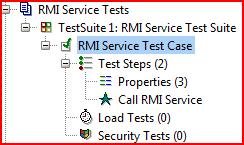
So first thing first: let's assume we are developing application which exposes web services and our goal is to have some integration testing in place. We don't want to hard-code SOAP requests and responses, we want to leverage Groovy to code real test cases. Thanks to soapUI, it's so easy to do by using Groovy test steps. Let me omit the routine and focus on bare bones details. I created a simple test project in soapUI with this structure:

The interesting part is here: Call web service Groovy step. Before we move on, let's copy several JAR files to <soapUI home>\bin\ext folder: Then we need to restart soapUI. Now we are ready to fill in the Groovy step with some code. Thanks to GroovyWS, calling web service from Groovy is very easy:

import groovyx.net.ws.WSClient

def properties = testRunner.testCase.getTestStepByName( "Properties" )
def service = new WSClient( properties.getPropertyValue( "url" ), this.class.classLoader )
service.initialize()

def token = service.login(
 properties.getPropertyValue( "username" ),
 properties.getPropertyValue( "password" )
)

assert token != null, "Login is not successful"
Properties step just contains username, password and url configuration:
And that's it! Now we can call additional web service methods and easily run this test case as load test: just to verify how web service behaves under heavy load. I usually do it overnight to see application heap, GC and whatnot. Cool.

Second use case: testing Java RMI services. This one requires a bit more work to be done. First of all, you need soapUI to be run using RMISecurityManager. Let's do this.

  1. Create file soapui.policy with content below and store it in <soapUI home>\bin:
    grant {
        permission java.security.AllPermission;
    };
    
  2. Change soapUI command line (<soapUI home>\bin\soapui.bat). Find the line set JAVA_OPTS=... and append to it:
    -Djava.security.policy=soapui.policy -Djava.security.manager=java.rmi.RMISecurityManager
    
    So you will have something like this: set JAVA_OPTS=-Xms128m -Xmx1024m -Dsoapui.properties=soapui.properties "-Dsoapui.home=%SOAPUI_HOME%\" -Djava.security.policy=soapui.policy -Djava.security.manager=java.rmi.RMISecurityManager
To run a bit ahead, we need to copy several JAR files to <soapUI home>\bin\ext folder: Now we a good and just need to restart soapUI. The sample project structure is very similar to what we did before:

Respective Groovy test step is built using Spring Framework which significantly simplifies creating RMI stubs and clients by getting rid of the boilerplate code.
import org.springframework.remoting.rmi.RmiProxyFactoryBean
import com.example.RmiServiceInterface

def properties = testRunner.testCase.getTestStepByName( "Properties" )
def invoker = new RmiProxyFactoryBean( 
 serviceUrl: properties.getPropertyValue( "url" ), 
 serviceInterface: com.example.RmiServiceInterface 
)
invoker.afterPropertiesSet()

def service = invoker.object
def token = service.login(
 properties.getPropertyValue( "username" ),
 properties.getPropertyValue( "password" )
)

assert token != null, "Login is not successful"
Now our service is ready for more serious testing. As with web services scenario Properties step just contains username, password and url (RMI) configuration:
I personally found soapUI to be very helpful tool in my developer toolbox and I definitely recommend using it.

Wednesday, April 1, 2009

Testing Spring applications

In my last post we talked about Spring. As a test infected developer, my commitment is to test as much as I can to be sure in quality of my code. So, is it feasible to test (and how?) applications which heavily use Spring? The answers are: yes and very easy with help of Spring testing framework. We will consider a few basic scenarios with testing simple Spring beans and then touch a little bit context-related issues.

So. let's start with Spring beans under the test. I prefer to use Java 5 and annotations to publish regular POJOs as Spring beans and declare dependency injection between beans as well. The bean will be MessageService as in code snippet below:

package com.krankenhouse.services;

@Component
public class MessageService {
@Autowired private ITransport impl;
@Autowired private ILogger logger;

public void send( final String message ) {
logger.log( message );
impl.send( message );
}

public String receive() {
final String message = impl.receive();
logger.log( message );
return message;
}
}

This bean is pretty simple and just demonstrates two important concepts: exporting POJO as Spring bean (@Component) and using dependency injection (@Autowired). Before diving into how to test it, let's create applicationContext.xml (placed inside WEB-INF folder) file.
<?xml version="1.0" encoding="UTF-8"?>
<beans
xmlns="http://www.springframework.org/schema/beans"
xmlns:xsi="http://www.w3.org/2001/XMLSchema-instance"
xmlns:context="http://www.springframework.org/schema/context"
xsi:schemaLocation="http://www.springframework.org/schema/beans
http://www.springframework.org/schema/beans/spring-beans-2.5.xsd
http://www.springframework.org/schema/context
http://www.springframework.org/schema/context/spring-context-2.5.xsd">

<context:annotation-config/>
<context:component-scan base-package="com.krankenhouse.services" />
</beans>

OK, now we're ready to write our first test, named MessageServiceTestCase. There are basically several ways to do that, depending which features do you need. The first one looks like:

package com.krankenhouse.services;

@RunWith( SpringJUnit4ClassRunner.class )
@ContextConfiguration( locations = {
"classpath:/META-INF/applicationContext.xml"
}
)
public class MessageServiceTestCase {
@Autowired private MessageService messageService;

public void testSend() {
messageService.send( "Message" );
}
}
And that's it! Spring takes care about context initialization, beans creation, dependency injection, etc. If you need application context inside the test, then a little bit different approach could be used (by inheriting test class from AbstractJUnit4SpringContextTests class):
package com.krankenhouse.services;

@RunWith( SpringJUnit4ClassRunner.class )
@ContextConfiguration( locations = {
"classpath:/META-INF/applicationContext.xml"
}
)
public class MessageServiceTestCase
extends AbstractJUnit4SpringContextTests {
public void testSend() {
MessageService messageService =
( MessageService )applicationContext
.getBean( "messageService");
messageService.send( "Message" );
}
}
There's one important issue concerning Spring context: only one context will be created for each test class instance (not test method!). If you would like to recreate context for each single test method, you have to adorn these ones with @DirtiesContext annotation. Unfortunately, there is no class-level annotation for that up to 2.5.x versions.